Skip to content
e‑FacturaRDCopilotOS

RDCopilotOS module · for companies operating in Romania · UBL 2.1 · CIUS‑RORomania · UBL 2.1 · CIUS‑RO

e‑Factura, followed to the final answer.

Romania requires B2B, B2C and B2G invoices to go through ANAF’s e‑Factura system. We connect your ERP to it: each invoice becomes CIUS‑RO XML, is checked before upload and comes back with its official state. On nok you see the reason in plain words, and the correction stays linked to the original.

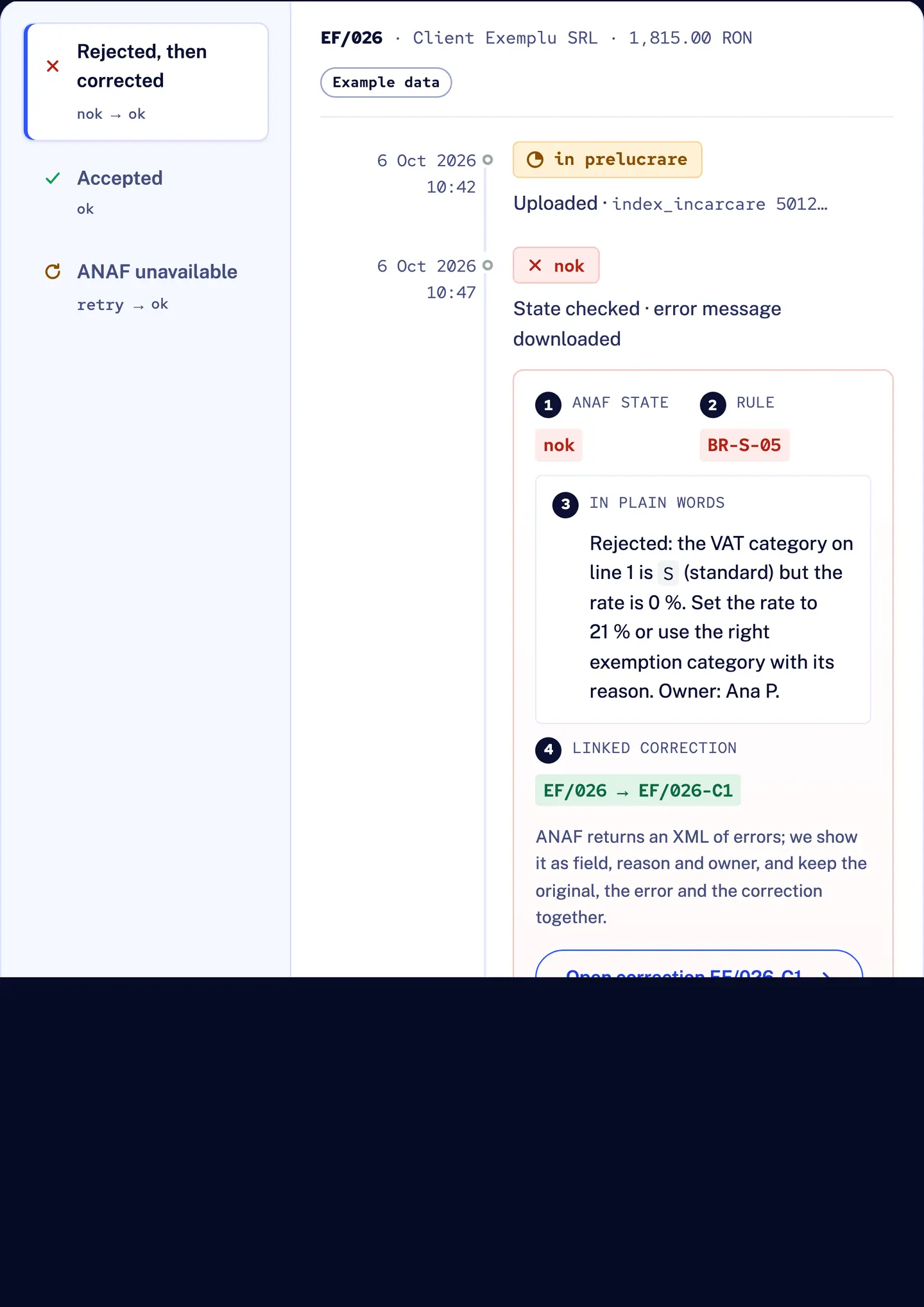
R&D COPILOT e-Factura: invoice EF/026 rejected by ANAF (nok), the reason explained in plain words with an owner, then the linked correction accepted (ok)
  1. Uploaded
  2. in prelucrare
  3. nok
  4. ok

Example dataInvoice EF/026: rejected by ANAF, explained, corrected and accepted.

Implementation project · one-off setup + monthly licence · EU hosting · support in English and Romanian

Manual vs connected

What changes when e‑Factura is part of the workflow

Show
Uploading in SPV by hand compared with R&D COPILOT
TaskBy hand in SPVConnected with R&D COPILOT
Producing the XML By hand:Exported or keyed in per invoice Connected:Prepared from the ERP invoice with your agreed field mapping
Catching errors By hand:After ANAF answers nok Connected:Before upload, on the field, with an owner
Knowing the state By hand:Checking SPV messages Connected:The official state and identifier on the invoice (in prelucrare, ok, nok)
Rejections By hand:An error XML to decode Connected:Reason in plain words, owner, correction linked to the original
Failed upload By hand:Easy to confuse with a rejection Connected:Each attempt recorded; upload kept separate from the final outcome
Several companies By hand:Certificates and SPV rights handled company by company Connected:Rights per person and per company; access removed in one place

Lifecycle

From your ERP to ANAF and back, in five steps

What happens, what we check and which ANAF interface is involved. Technical detail is folded under each step for whoever wires it up.

01ERP

Issue the invoice where you already work

Invoices start in R&D COPILOT ERP or in the billing system you already use. During implementation we map your document types, series and buyer data, so nobody retypes anything.

Technical detail
  • R&D COPILOT ERP connects directly; other systems through R&D COPILOT Integrations, scoped per project.
  • Document type codes under CIUS‑RO: 380 invoice, 381 credit note, 384 corrected invoice, 389 self-billed invoice, mapped per project.
  • Series mapping; one company profile per VAT code.
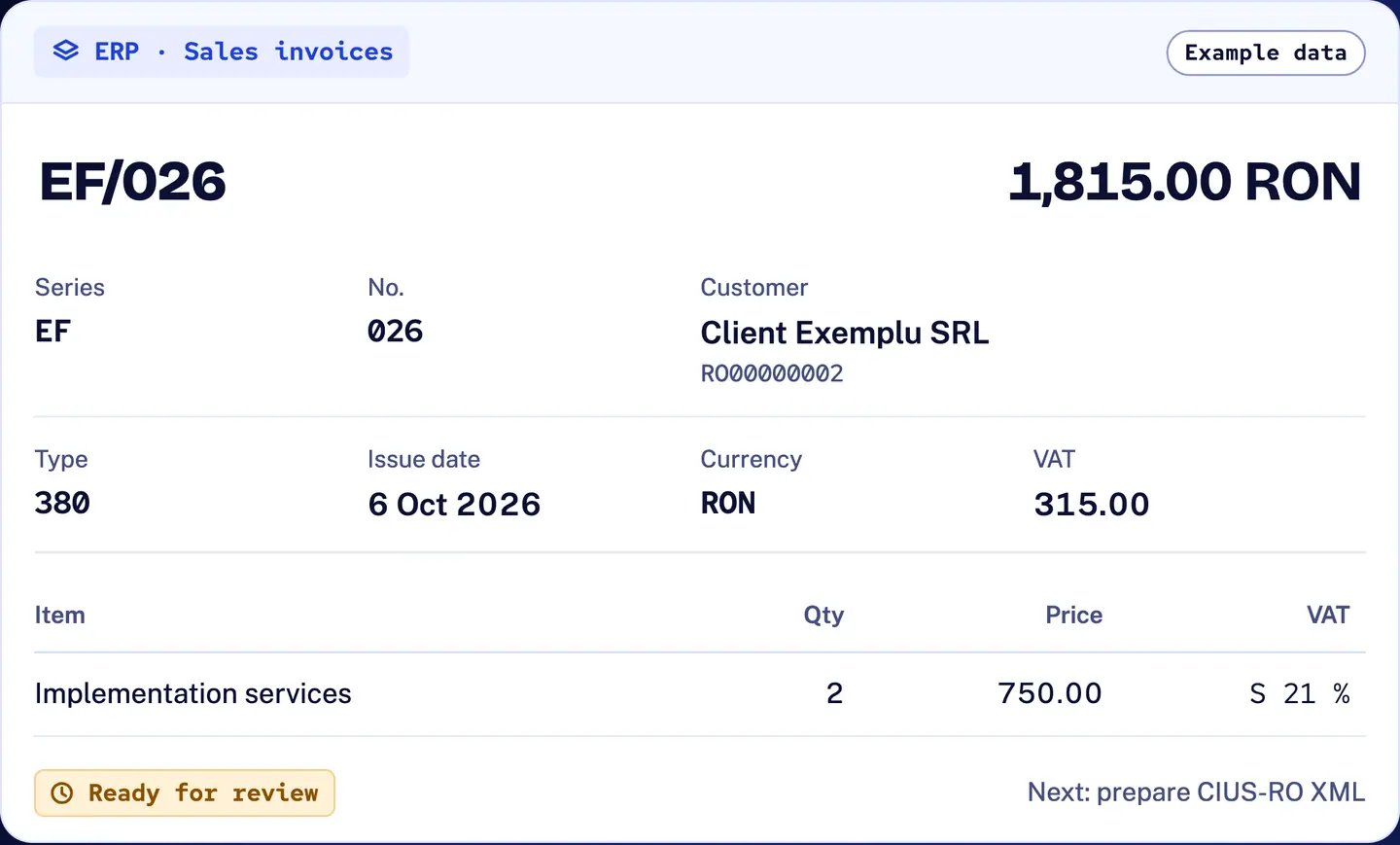
R&D COPILOT e-Factura: example sales invoice EF/026 in the ERP, 1,815.00 RON for Client Exemplu SRL, document type 380, ready for review before the CIUS-RO XML is prepared
eF · Example data

02UBL XML

Checked before ANAF ever sees it

The invoice is prepared as UBL 2.1 XML under CIUS‑RO and checked before the submission queue: mandatory fields, buyer VAT code, VAT category against rate, units of measure, and totals that add up line by line. Each issue sits on its field, with the person responsible.

Fields we check most often (10)
Fields we check most often
BTFieldComes from
BT-1Invoice numberSeries + number
BT-2Issue dateInvoice date
BT-5Invoice currencyCurrency
BT-31Seller VAT identifierCompany profile
BT-44Buyer nameCustomer card
BT-48Buyer VAT identifierCustomer card
BT-130Unit of measure codeItem / UoM mapping
BT-151VAT category codeTax mapping
BT-153Item nameItem
BT-112Total with VATCalculated
Technical detail
  • The submission queue checks that the version reviewed is the version sent.
  • ANAF’s validare service (FACT1 for invoices, FCN for credit notes) can be used as a second check where agreed.
  • transformare/FACT1 returns ANAF’s PDF rendering of the XML.
  • Rule example in plain words: BR-CO-15 — “total with VAT must equal total without VAT plus VAT”.
Validate e‑Factura data before it reaches the submission queue
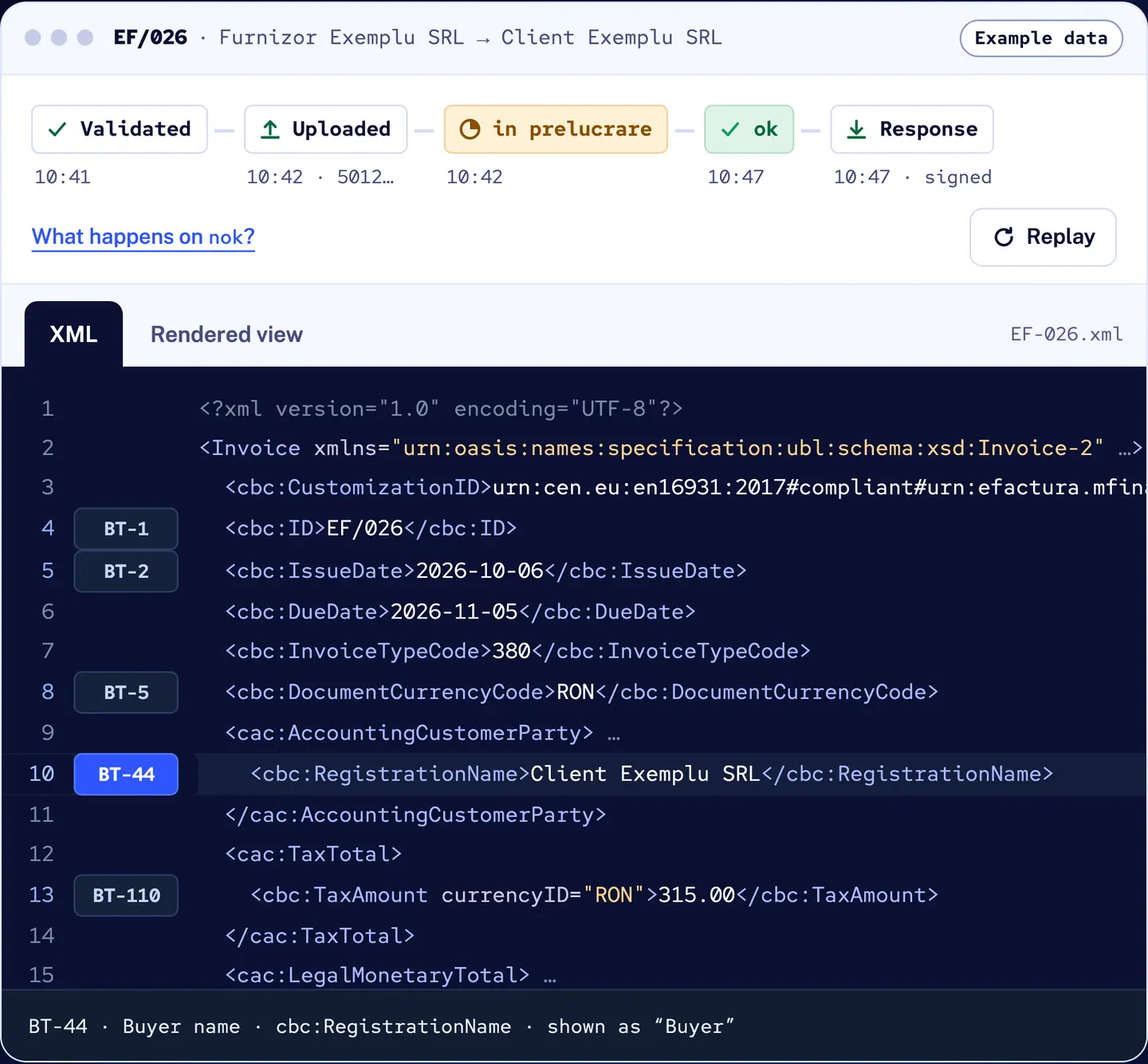
R&D COPILOT e-Factura: example invoice EF/026 with its status trail from validated to ok and the CIUS-RO XML, the Buyer name field (BT-44) selected
eF · Example data

03SPV

Uploaded under your company’s authorisation

Uploads go to ANAF’s SPV through the official interface, authorised by a person enrolled in SPV for your company with their qualified digital certificate. We agree who holds the credentials and where, which companies each colleague may act for, and how access is removed when someone leaves.

Technical detail
  • The authorising person is an administrator, accountant or empowered representative enrolled in SPV; removing access also stops any background operation that uses it.
  • OAuth 2.0 authorisation via ANAF with a qualified certificate.
  • POST /upload?standard=UBL&cif=00000001 (numeric part of the VAT code) returns index_incarcare.
  • ANAF runs separate test and production environments; the test environment is used during implementation, before go-live.
  • B2C invoices use ANAF’s separate uploadb2c endpoint, mandatory since 31 March 2025.
  • ANAF access tokens are valid for 90 days and refresh tokens for 365 days; renewal is tracked per company.
  • The qualified certificate stays with its holder; where the OAuth tokens are kept is set in your implementation agreement.
Scope e‑Factura access and responsibilities for several companies
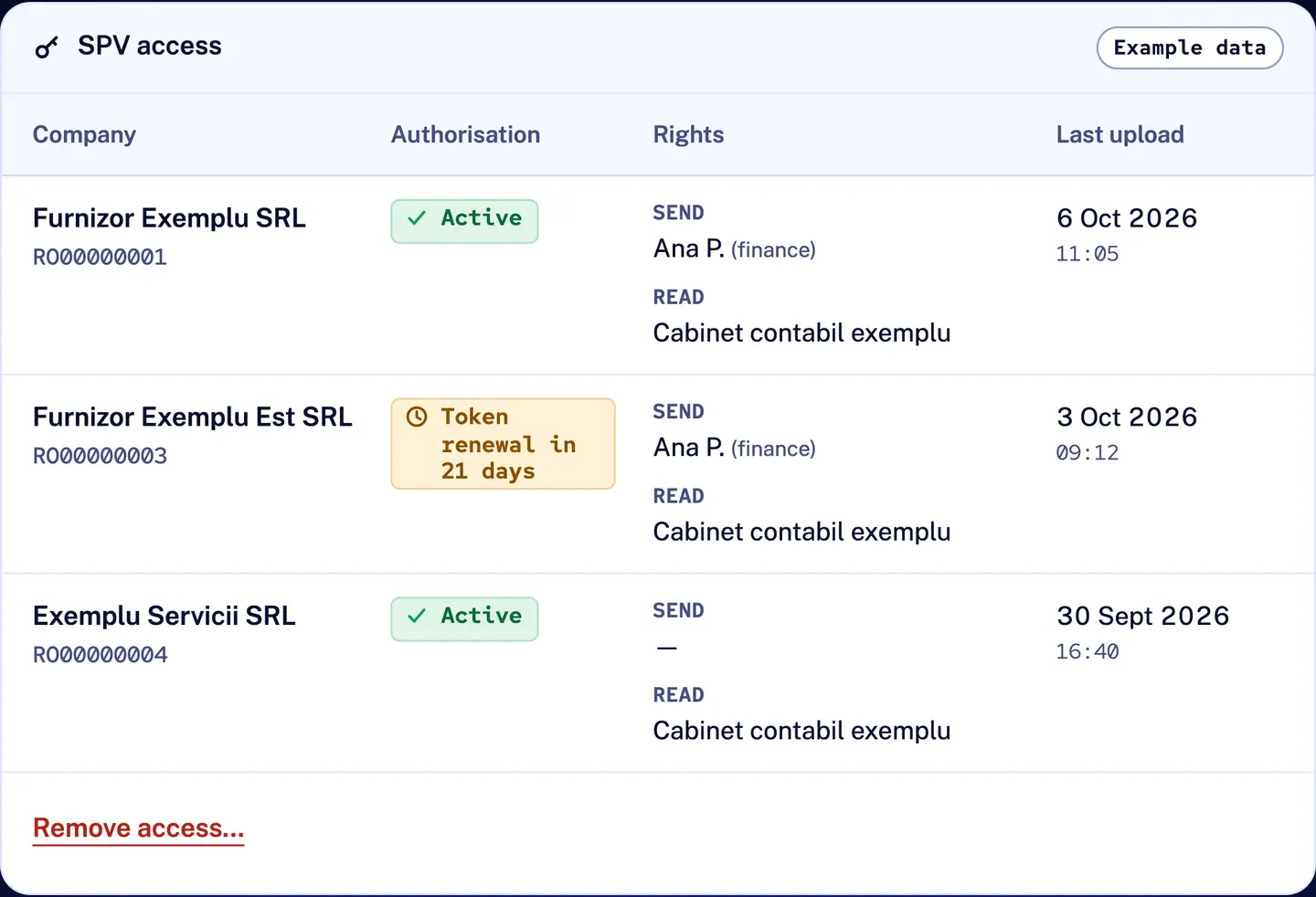
R&D COPILOT e-Factura: SPV access for three example companies, with authorisation state, send and read rights per person, token renewal due in 21 days and the last upload per company
eF · Example data

04Status

ok, nok or processing: always on the invoice

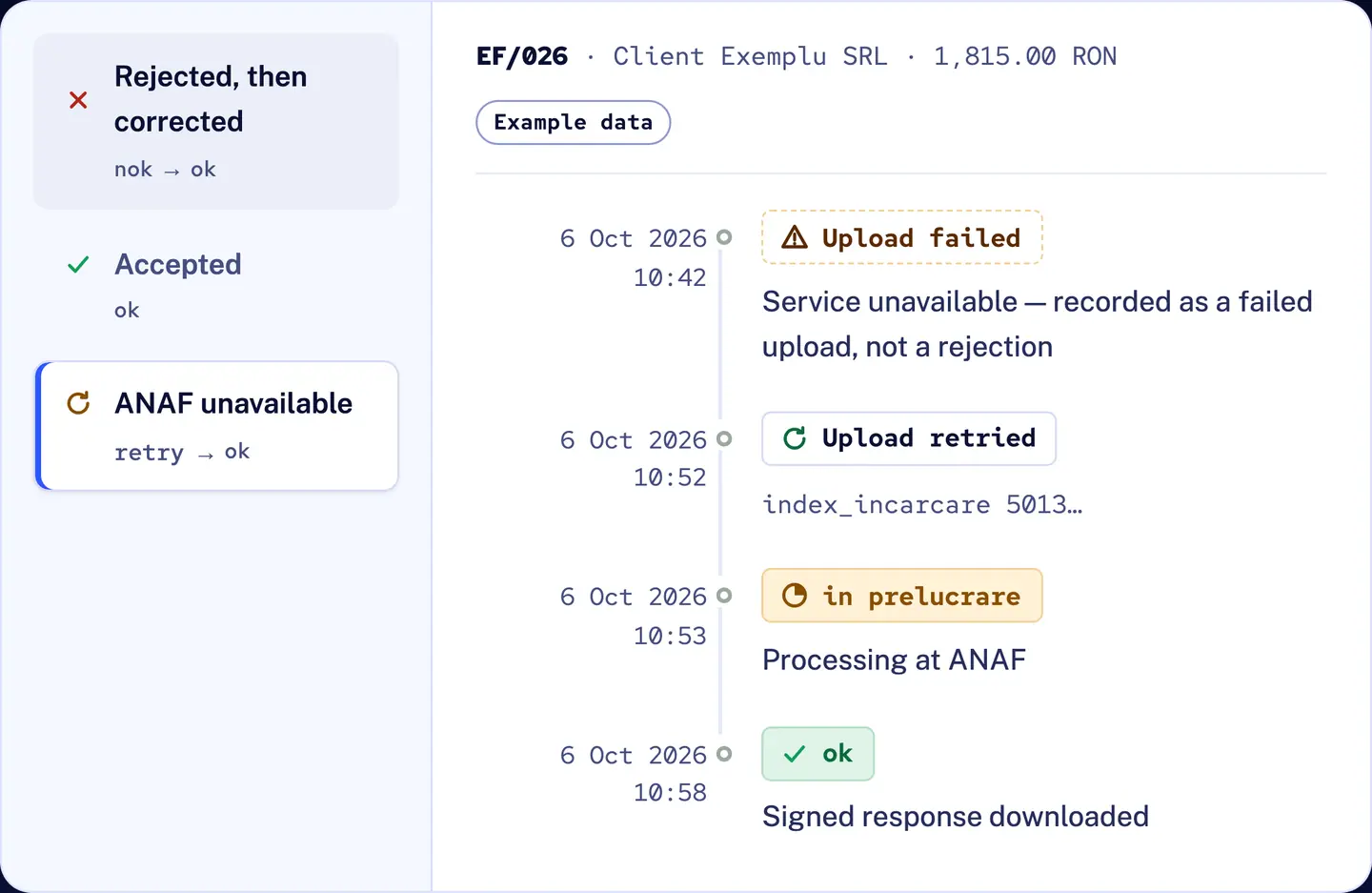
ANAF’s answer is written back on the invoice with the official identifier. On ok the signed response is downloaded and kept. On nok you get the reason in plain words, the field and an owner. A failed upload is recorded as a failed upload, never as a rejection, and retried.

in prelucrare
ANAF has the file and is still processing it. Wait; the state is checked again.
ok
Validated and processed. The invoice is now available to the buyer, and the response (invoice + MF signature) is ready to download. Response downloaded and kept with the invoice.
nok
Rejected. The invoice does not reach the buyer; the response holds the error file and the MF signature. Reason shown in plain words, owner assigned, correction linked.
XML cu erori nepreluat de sistem
Refused at upload: the file never entered processing and the error came back in the upload response. Fix the file and upload it again as a new attempt.
Technical detail
GET /stareMesaj?id_incarcare=…
→ in prelucrare | ok | nok
  | XML cu erori nepreluat de sistem
  ok | nok → id_descarcare

GET /descarcare?id=…
→ ZIP: XML + MF signature
  (or the error XML)
  • Upload success is recorded separately from the final outcome.
  • Failed uploads are retried automatically on the schedule you approve, and the status is checked first so the same invoice is not sent twice.
  • Status checks and downloads stay within ANAF’s published limits (100 status checks and 10 downloads per message per day).
Follow e‑Factura from upload to the official response
R&D COPILOT e-Factura: ANAF unavailable at upload, recorded as a failed upload rather than a rejection, retried automatically, then processed and accepted (ok)
eF · Example data

05Response & correction

The answer stays with the invoice

Every invoice keeps its own history: each upload attempt and its official identifier, the state ANAF returned, the signed response or error message, and any correction linked to the original. Anyone with access to that company sees the same record.

Technical detail
  • Responses are kept exactly as downloaded, so the MF signature can be checked at any time with ANAF’s signature-validation service.
  • The correction references the original invoice (BT-25).
  • ANAF keeps responses downloadable for 60 days only, so each one is downloaded and stored with its invoice. Where they are stored for the 10 years accounting law requires is agreed in writing.
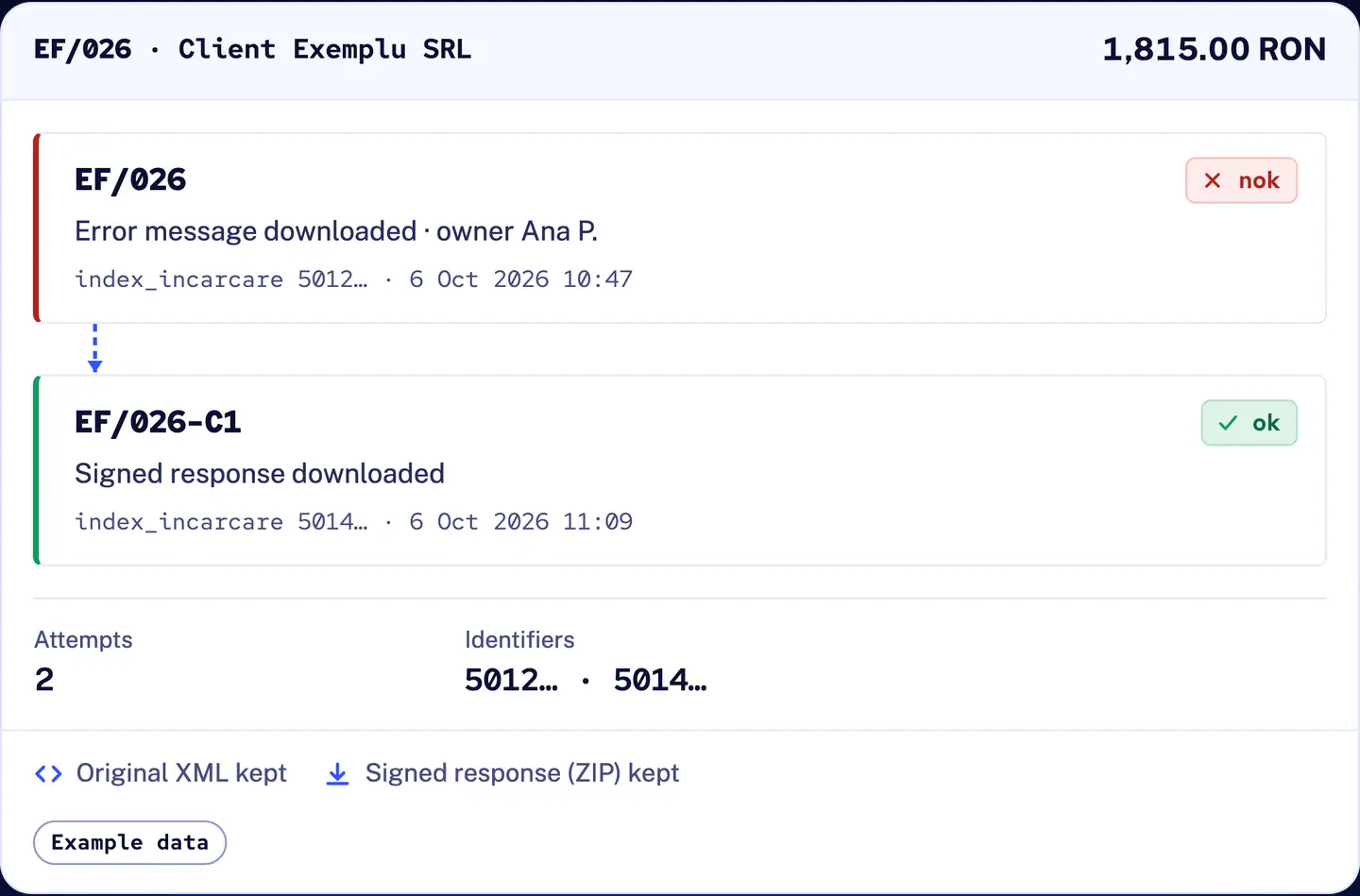
R&D COPILOT e-Factura: the history of invoice EF/026, the rejected original and the accepted correction EF/026-C1 linked together, with two upload identifiers, the original XML and the signed response kept
eF · Example data
ERP · Sales invoicesExample data
EF/0261,815.00 RON
Series
EF
No.
026
Customer
Client Exemplu SRL RO00000002
Type
380
Issue date
6 Oct 2026
Currency
RON
VAT
315.00
Invoice lines
ItemQtyPriceVAT
Implementation services2750.00S 21 %
Ready for reviewNext: prepare CIUS‑RO XML
EF/026 · Furnizor Exemplu SRL → Client Exemplu SRL Example data
  1. Validated
  2. Uploaded
  3. in prelucrare
  4. ok
  5. Response
<?xml version="1.0" encoding="UTF-8"?><Invoice xmlns="urn:oasis:names:specification:ubl:schema:xsd:Invoice-2" …>  <cbc:CustomizationID>urn:cen.eu:en16931:2017#compliant#urn:efactura.mfinante.ro:CIUS‑RO:1.0.1</cbc:CustomizationID>  <cbc:ID>EF/026</cbc:ID>  <cbc:IssueDate>2026-10-06</cbc:IssueDate>  <cbc:DueDate>2026-11-05</cbc:DueDate>  <cbc:InvoiceTypeCode>380</cbc:InvoiceTypeCode>  <cbc:DocumentCurrencyCode>RON</cbc:DocumentCurrencyCode>  <cac:AccountingCustomerParty> …    <cbc:RegistrationName>Client Exemplu SRL</cbc:RegistrationName>  </cac:AccountingCustomerParty>  <cac:TaxTotal>    <cbc:TaxAmount currencyID="RON">315.00</cbc:TaxAmount>  </cac:TaxTotal>  <cac:LegalMonetaryTotal> …    <cbc:TaxInclusiveAmount currencyID="RON">1815.00</cbc:TaxInclusiveAmount>  </cac:LegalMonetaryTotal></Invoice>

Select a BT tag to see the field it carries.

SPV accessExample data
Companies, authorisation and rights
CompanyAuthorisationRightsLast upload
Furnizor Exemplu SRLRO00000001ActiveSend Ana P. (finance)Read Cabinet contabil exemplu6 Oct 2026 11:05
Furnizor Exemplu Est SRLRO00000003Token renewal in 21 daysSend Ana P. (finance)Read Cabinet contabil exemplu3 Oct 2026 09:12
Exemplu Servicii SRLRO00000004ActiveSend —Read Cabinet contabil exemplu30 Sept 2026 16:40

+2 more companies with the same access rules

Remove access…

In a live setup this asks you to confirm: Ana P. loses send rights for all three companies, and any background operation using her access stops.

EF/026 · Client Exemplu SRL · 1,815.00 RONExample data
  1. in prelucrare

    Uploaded · index_incarcare 5012…

  2. nok

    State checked · error message downloaded

    1. 1ANAF statenok
    2. 2RuleBR-S-05
    3. 3In plain wordsRejected: the VAT category on line 1 is S (standard) but the rate is 0 %. Set the rate to 21 % or use the right exemption category with its reason. Owner: Ana P.
    4. 4Linked correctionEF/026 → EF/026-C1

    ANAF returns an XML of errors; we show it as field, reason and owner, and keep the original, the error and the correction together.

  3. in prelucrare

    Correction EF/026-C1 uploaded · index_incarcare 5014…

  4. ok

    Signed response downloaded

EF/026 · Client Exemplu SRL1,815.00 RON
  1. EF/026nok

    Error message downloaded · owner Ana P.

    index_incarcare 5012… · 6 Oct 2026 10:47
  2. EF/026-C1ok

    Signed response downloaded

    index_incarcare 5014… · 6 Oct 2026 11:09
Attempts
2
Identifiers
5012… · 5014…

Original XML keptSigned response (ZIP) kept

Example data

Try it

Fix the open checks before anything leaves for ANAF

The preparation screen with example data. Fill in the buyer and the order reference, reconcile the totals and prepare the invoice.

  • Each check names its field
  • Totals reconciled line by line
  • Checked before the submission queue
PREPARATION · EF/026 · RONTry it: fix the open checks.
Issue date6 Oct 2026CurrencyRONStageNeeds review
SupplierYour legal entityCompany and tax profile are configured during implementation.

Select an item in the review margin to go directly to the field. Your changes stay in this browser session.

EF / 02601 / 03

Roles

One workflow, three people

See which invoices are still processing, which were rejected and who owns each correction, without opening SPV.

in prelucrare2
nok1owner: Ana P.
ok12
This week · example data

Coverage

Coverage and control

Scope
B2B, B2C and B2G invoices: which apply to you is confirmed per project.
Documents
Invoices (380), credit notes (381), corrected invoices (384) and self-billed invoices (389), mapped from your document types.
When it is sent
Straight after validation, or only after a person approves it: you choose per company.
Who can do what
Send or read only, per person and per company; access removed in one place.
Where data lives
EU data centres. ANAF responses are downloaded and kept with each invoice; where tokens and responses are stored for the 10 years accounting law requires is set in your implementation agreement.

From idea to implementation

Guides for your workflow

Implementation

Set up once, then it runs every day

  1. 01

    Review your example invoices

    We go through the invoices you send, your sources, document types, series, companies and who corrects what.

  2. 02

    Configure and check

    Field mapping, XML preparation, the validation rules that apply to you and the review path before sending.

  3. 03

    Test before go-live

    Before go-live, invoices go through ANAF’s test environment, rejections included.

  4. 04

    Go live and support

    SPV authorisation per company, the agreed credential arrangement, then day-to-day support in Romanian and English.

Need supplier invoices received in SPV (FACTURA PRIMITA) brought into your ERP, or long-term storage of responses? We scope these per project.

Pricing

How pricing works

01

One-off implementation fee

Invoice review, mapping, configuration, testing and go-live for your companies.

02

Monthly licence

EU hosting, updates and support.

Extra work is billed at a fixed hourly rate. Scope and price are confirmed in writing before we start.

Send invoices for review

Included

  • Validation before submission
  • Field owners and version check
  • Upload attempts and official identifier
  • Processing states on the invoice
  • Downloaded signed responses
  • Corrections linked to the original
  • Failed uploads kept separate from rejections
  • Multi-company permissions and access removal
  • EU hosting
  • Support in Romanian and English

Questions

Questions finance and IT ask first

Something else? Ask it in the inquiry form and we answer in Romanian or English.

Who has to use e‑Factura?

Businesses established in Romania send their invoices through RO e‑Factura: B2G since July 2022, B2B since January 2024 and B2C since January 2025. The main exceptions are fiscal receipts that qualify as simplified invoices, intra-EU supplies to buyers with another EU VAT code, and suppliers identified only by personal numeric code (CNP), who may opt in. We confirm which of your documents fall in scope at the start, including for a Romanian entity that is part of a wider group.

What do you need from us to connect to SPV?

A qualified digital certificate for an authorised person of each company, enrolment in SPV, and a decision on who may send and who may only read. An accountant enrolled in SPV for several client companies can authorise each of them with their own qualified certificate. We go through ANAF’s test environment before go-live. You stay the owner.

What happens when ANAF rejects an invoice?

The state becomes nok. The error message is downloaded, the field and reason are shown in plain words with an owner, and the correction you send stays linked to the original.

And when ANAF’s system is unavailable?

The attempt is recorded as a failed upload, not a rejection, and retried automatically on the schedule you approve. Before any retry, the status is checked so the same invoice is not sent twice. Every attempt stays visible.

Do we have to use R&D COPILOT ERP?

No. R&D COPILOT ERP connects directly; other billing or ERP systems connect through R&D COPILOT Integrations, and we scope that connection with you.

Can our external accountant work in it?

Yes. Access is given per person and per company, with send or read-only rights, and removed in one place, including background operations that use it.

Where is the data kept, and who holds the credentials?

The service runs in EU data centres. The qualified certificate never leaves its holder: SPV access works through ANAF’s OAuth tokens, issued after that person signs in. Where tokens and downloaded responses are kept, and for how long, is set in your implementation agreement.

How much does it cost?

A one-off implementation fee and a monthly licence covering hosting, updates and support. Both depend on the number of companies and source systems, so we quote after reviewing your example invoices.

Is there a deadline for uploading invoices?

Yes. Since 1 January 2026 an invoice must reach RO e‑Factura within 5 working days of its issue date, and no later than 5 working days after the legal invoicing deadline. Late uploads are fined from RON 1,000 to RON 10,000 depending on company size. The status view shows every invoice that is not uploaded yet.

How are credit notes and storno invoices handled?

Each one is sent the way your ERP issues it: as a credit note (381), or as an invoice with negative quantities, since the unit price may not be negative. It goes through the same checks and stays linked to the invoice it corrects.

What about invoices in foreign currency or with reverse charge?

Currency and VAT category (BT-5, BT-6, BT-151) are part of the mapping and the checks. A foreign-currency invoice still carries its VAT total in RON, as CIUS‑RO requires, and reverse-charge lines use category AE. We test your real cases on the example invoices before go-live.

We already upload in SPV manually or use another provider. Can we switch?

Yes. We agree a switch-over date per company so no invoice is sent twice. Invoices sent before that date stay where they are unless bringing them in is part of the scope.
Send us a few example invoices. We’ll show you what we would check.

Tell us where your invoices come from, how many companies you run and who corrects errors today. We’ll review the invoices and scope the connection, the checks and the price with you.